Scope 3 emissions software that shows its working
Scope 3 is the hardest part of a footprint to evidence: the data sits with suppliers, staff and hauliers, not on your own bills. Emissa measures all fifteen GHG Protocol categories from supplier data, spend, travel records and surveys — and writes the method, the assumptions and their source onto every line.
Every Scope 3 category, and how its data arrives
Scope 1 is what you burn or release yourself, Scope 2 is the energy you buy, and Scope 3 is the rest of the value chain. The Emissa ledger carries all fifteen categories of the GHG Protocol Scope 3 Standard; every route below passes through the same validation, calculation and audit trail.
| GHG Protocol category | How the data gets into Emissa |
|---|---|
| 1. Purchased goods & services | Supplier-specific factors from the supplier portal; suppliers' published emissions allocated by your spend with them; spend-based estimates on operating spend; materials by weight. |
| 2. Capital goods | Capital expenditure is routed here from the spend import — in full in the year of purchase — instead of being mixed into category 1. |
| 3. Fuel- and energy-related activities | Well-to-tank and transmission and distribution loss lines are derived automatically from each fuel and electricity line, using the upstream factor published for the same fuel in the same dataset and year. |
| 4. Upstream transportation & distribution | Freight and haulage activity from documents or CSV exports, each line with its own derived upstream line. |
| 5. Waste generated in operations | Waste documents and CSV exports — or, where nothing is measured yet, the waste-from-desk-numbers model with its assumptions and their source stated. |
| 6. Business travel | Flights from airport codes (great-circle distance, then the haul band picks the factor family), travel distance from spend, and travel documents and exports. |
| 7. Employee commuting | An anonymous staff survey, one link per business unit, turned into a mode split and distances — one commuting model per business unit. |
| 8 to 15. Leased assets, downstream transport, sold products, franchises, investments | Entered manually, imported by CSV, or estimated with a model whose scope and category you set — for example the equipment energy model for products you sell. |
Supplier-specific figures, not only spend
Spend-based estimates are a starting point. Emissa gives you two routes to something better, and keeps the evidence for both.
A supplier portal, no account needed
Invite suppliers to submit product emissions through a personal link. A reviewed submission becomes a supplier-specific Scope 3 factor with full provenance.
Requests that chase themselves
A request covers a reporting period and sends up to two automatic reminders. You can see who has been invited, who has opened the link and who has answered.
Published disclosures, researched for you
Emissa AI looks up a supplier's published emissions and revenue — Companies House filings for UK companies, sustainability reports elsewhere — and stores every supporting document as evidence.
Allocated by your share of their revenue
After a person has reviewed the figures, your spend with the supplier allocates a share of their footprint (spend ÷ revenue — the GHG Protocol's economic allocation) as a supplier-specific line.
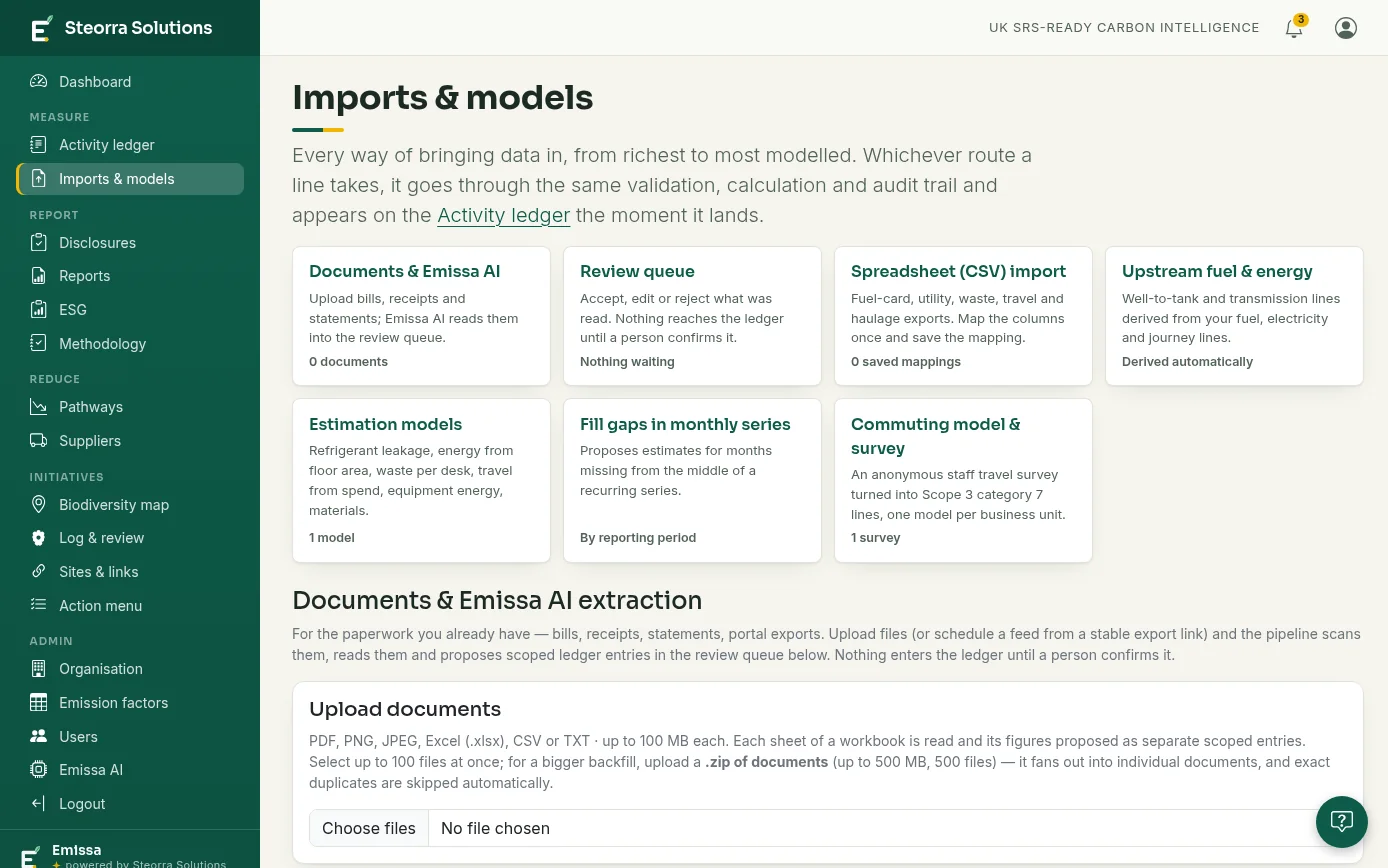
Spend routed before it is estimated
Operating, capital and excluded — decided once
- Capital spend goes to category 2. Operating spend stays in category 1, so the two are never mixed.
- Fuel and energy spend is left out of the spend-based estimate, because those emissions are already measured — nothing is subtracted by hand and nothing is counted twice.
- Rules are remembered. "Utilities is excluded", "this supplier is capital": set once, applied to every later spend import.
- Estimates are flagged as estimates, with their data quality score, so they are easy to find and to replace.
Business travel and commuting without the spreadsheet
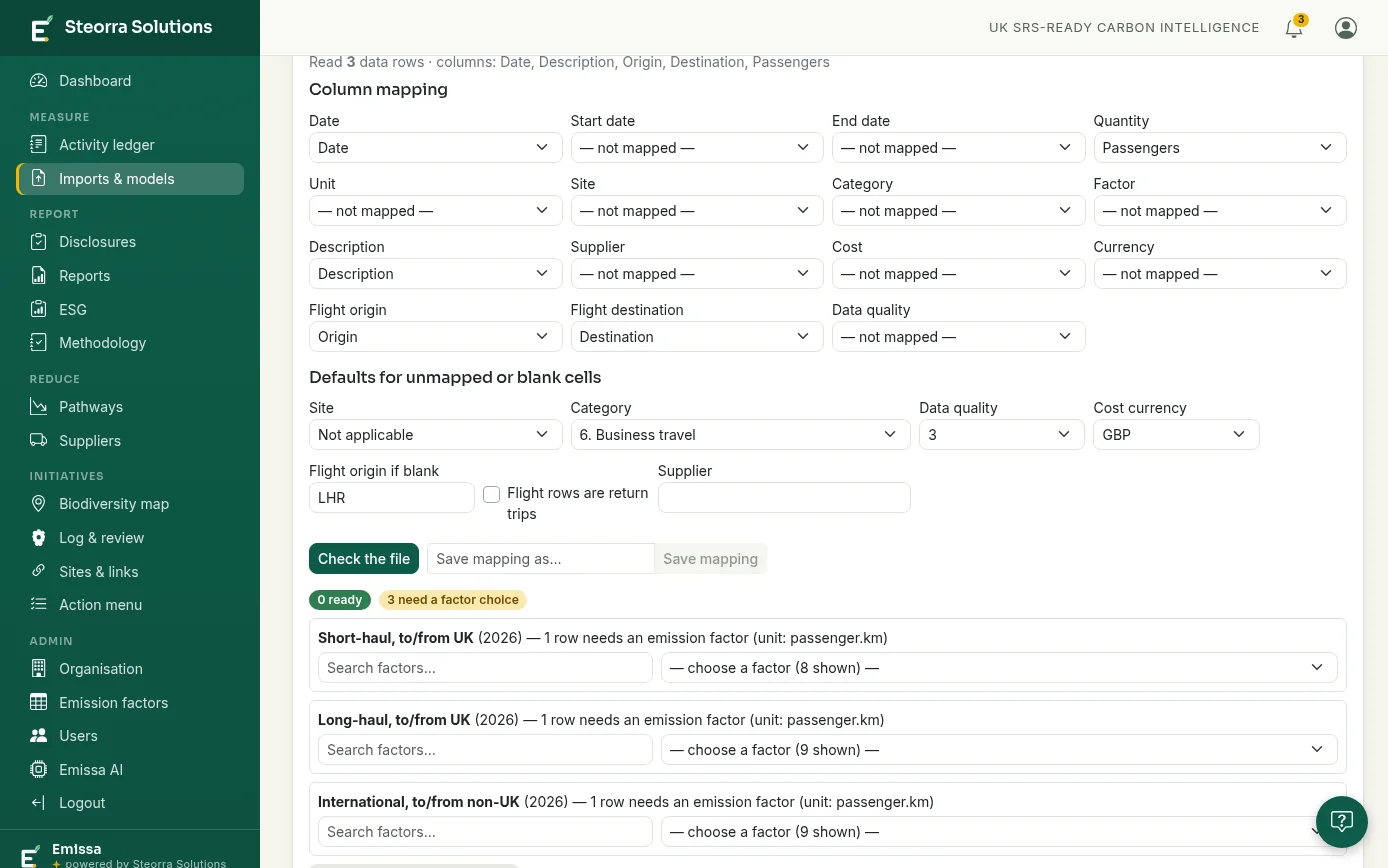
Flights from airport codes
- Map two airport columns and the importer works out the distance, the passengers and the haul band, then asks for the factor once per band.
- No extra distance uplift: the UK Government factors already carry it.
- A missing origin can take a stated default — and the assumption is written on the line.
Commuting from a survey, not a guess
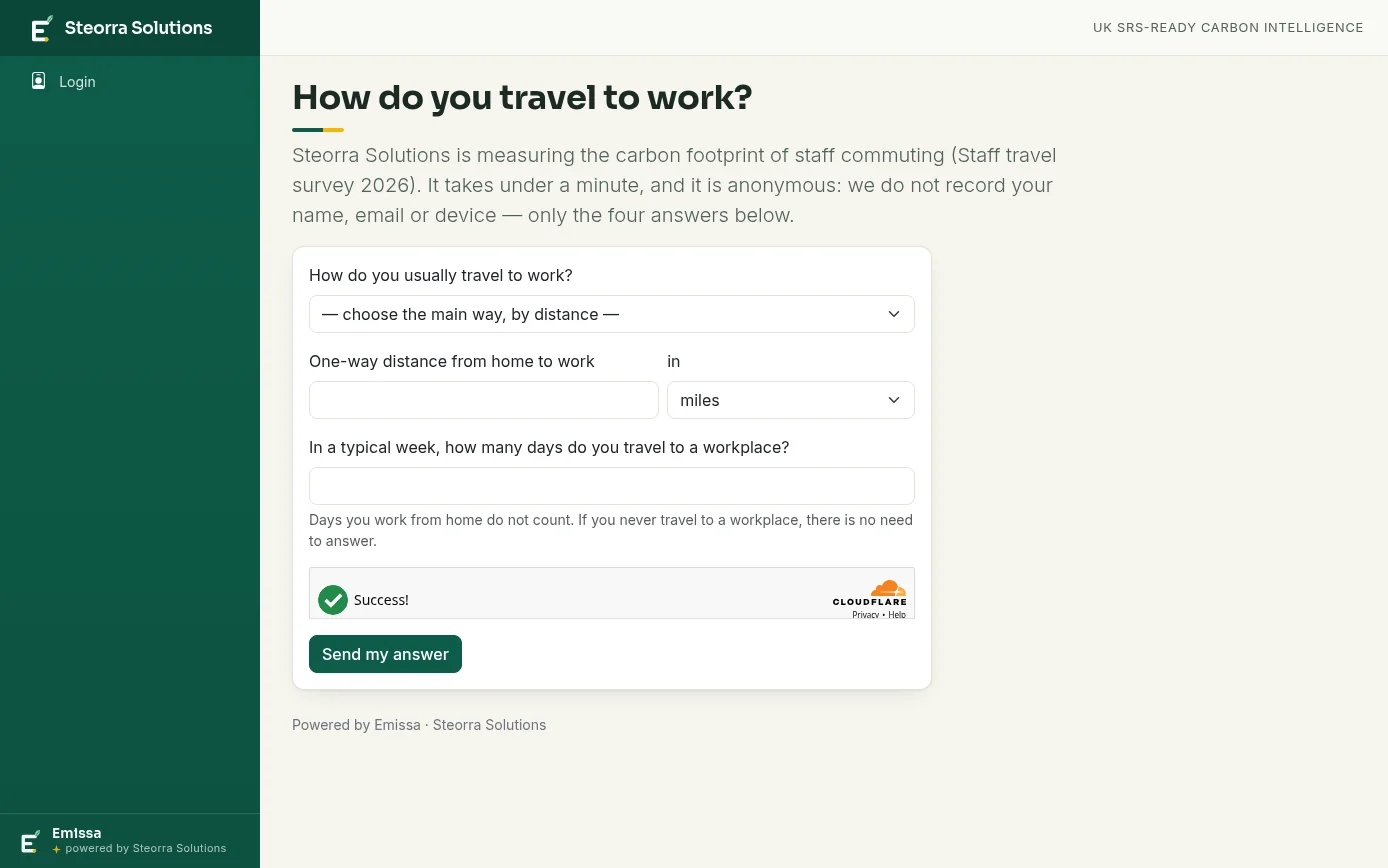
- One shareable link per business unit, four questions, nothing identifying stored.
- "Fill the model from these answers" turns the responses into the mode split and distances.
- Home-working days drop out instead of being spread across the modes; the response count and rate are written on every line.
Category 3 derived, not uplifted
Each fuel, electricity, travel, commuting and freight line derives its own upstream line — well-to-tank, and transmission and distribution losses for electricity — from the same quantity, using the upstream factor published for the same fuel in the same dataset and year, not an average percentage. Edit or delete the source line and the derived lines follow.
Estimation models with the working shown
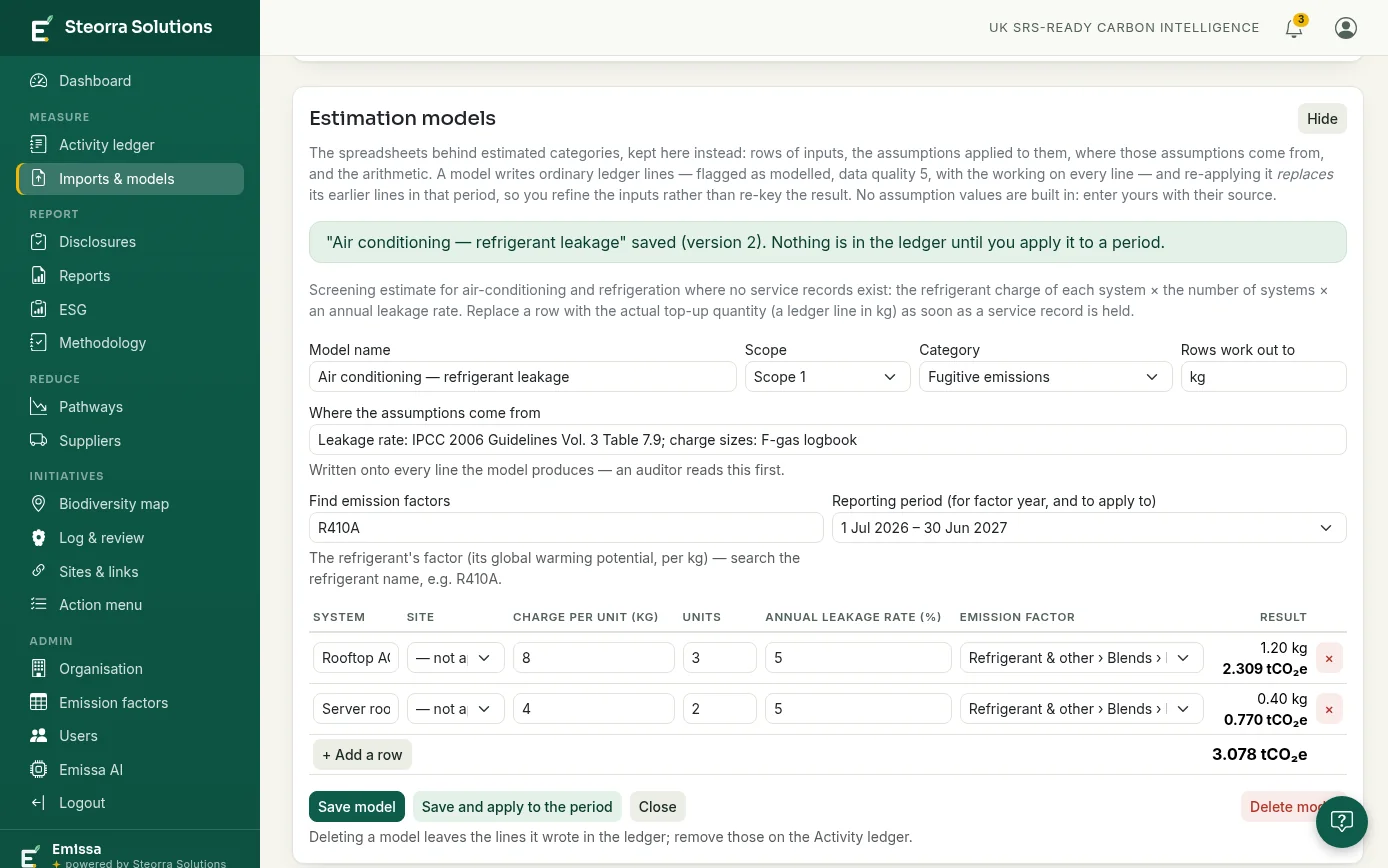
- Six templates, no built-in numbers: refrigerant leakage, energy from floor area, waste from desk numbers, travel from spend, equipment energy and materials by weight.
- You enter the assumptions and where they come from. The source is mandatory.
- Previewed as tCO₂e before anything is saved; re-applying a model replaces its earlier lines rather than adding to them.
Common questions
What are Scope 3 emissions?
Under the GHG Protocol, Scope 1 covers emissions from sources a business owns or controls, Scope 2 covers the energy it buys, and Scope 3 covers the other indirect emissions in its value chain — fifteen categories, from purchased goods and services to investments.
Do we need data from our suppliers before we can start?
No. Emissa can start from the spend you already have, with operating spend, capital spend and excluded spend routed separately. Supplier-specific figures replace the estimates as reviewed supplier submissions and published supplier disclosures arrive.
How does Emissa avoid counting the same emissions twice?
Procurement spend is routed before it is estimated: capital spend goes to category 2, and fuel and energy spend is left out of the spend-based estimate because those emissions are already measured in Scopes 1 and 2 and category 3. The routing rules are remembered and applied to every later import.
Can estimated Scope 3 figures be audited?
Yes. Estimates are flagged as estimates and carry a data quality score, and the assumptions, their source and the arithmetic are written onto every line a model produces — so an auditor can find them, and you can replace them when measured data arrives.
Is supplier data accepted automatically?
No. Supplier submissions and researched figures wait for a person to review them. Nothing reaches the ledger without someone choosing to add it.
More of the platform
Scope 1 and 2 emissions
Gas, fuel, refrigerant and electricity bills turned into ledger lines, with Scope 2 both location- and market-based.
UK SRS reporting
A disclosure workbook on the four pillars, filled from the ledger, with reports and an audit pack.
Defra conversion factors
Each annual gov.uk release imported automatically and applied to activity dated in its own year.
Carbon audit trail
Every figure walked back to its factor version, calculation trace and source document.
Biodiversity initiatives
Site-by-site actions on one map, linked into pollinator highways and reported by client or region.
The whole platform
Measure, report and reduce: how the ledger, the methodology statement and the models fit together.
See it with your own data
A demo takes half an hour — bring a handful of real bills and watch them become an auditable ledger.
Book a demo